C2P: Workflow and Search Improvements
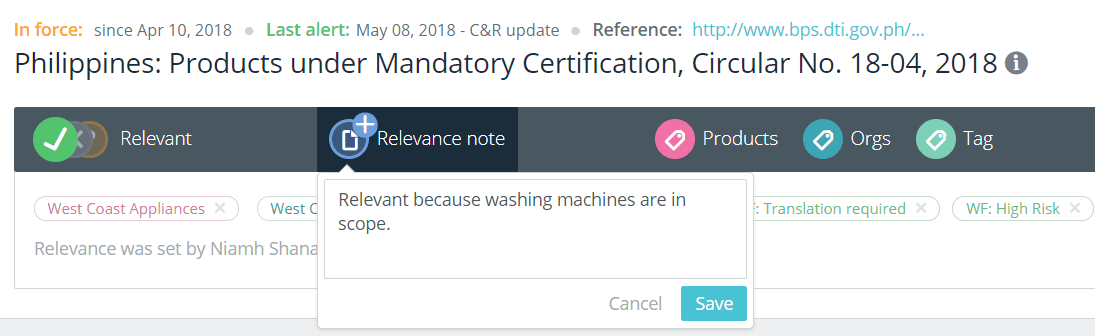
With our 5.8 release we’ve made some design and search changes to C2P that we think users will really like. Faster workflows on regulations page With the newly designed regulations page users can get their work done faster, with all the features needed available underneath the main heading. Users can:
- Mark a regulation as relevant (yes/no/maybe)
- Add a relevance note
- Add tags for products, the organization and other workflows, such as ‘monthly review’, ‘urgent’, ‘translation needed’, and ‘review complete’
All of the information added by users or their teams stays at the top of the page for increased visibility and access. Marking a regulation as relevant and adding a relevance note Improvements to Tasks To include more than one person on a task simply use the @mention, e.g. @john.smith. The system will recognize their name as a user and send them a copy of the email with details of the task. Table of Contents
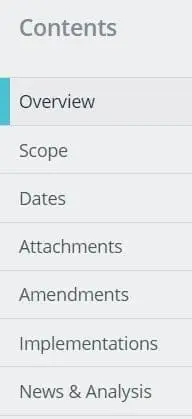 |
Another user friendly improvement is that the Table of Contents is now always visible while scrolling down a regulations page. This will help users to better navigate long pages of content and easily jump to the sections they need. |
Improvements to Library Searches Text Search The text search capability is continuing to improve, with the system now recognizing searches for regulation reference numbers and CAS numbers. Search by a particular time frame Users can now filter search results to a specific time period, e.g. search alerts from last month by My Responsibility. 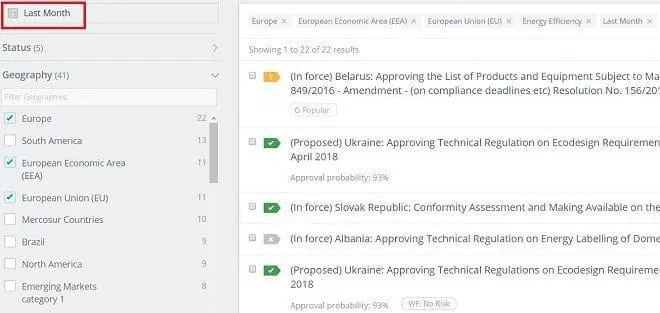 Searching regulations using a particular time frame Excel Exports Search results can be exported to Excel with results now including the ‘Status’ of a regulation and your notes such as ‘is it relevant?’. Visibility across all regulations in the Library When users search in the Library, the results now show on the following three tabs:
- My Alerts – regulations in the topics the user subscribed to
- Company Alerts – regulations in the topics the user’s company is subscribed to
- All Results – regulations from the entire C2P database, including topics the user is not subscribed to. This allows users to see the full range of the information in C2P in case they need access to other content areas to answer their query
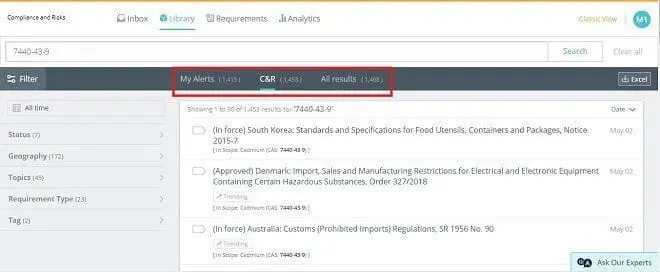 Search on CAS number for cadmium filtered by my company’s subscription If you would like to find out more about C2P, please Talk to Us

The Ultimate Product Compliance Playbook
What the World’s Leading Product Organizations Have Figured Out About Product Compliance